JavaServer Faces Newbie NavigateError


So Im learning JavaServer Faces using netbeans 6.9, Tomcat 6.0 and Java 1.6.0_22; HotSpot(TM) 64-Bit Server VM 17.1-b03 (whatever it is) and i get caught with lots of errors, I kinda like PHP more than Java but work is work.

The Problem
Studying the navigation in Server Faces (you know the XML tags in faces-config.xml) i was having some troubles with a h:commandButton . After clicking that dammed supersubmit button that jsf kindly created for me (hate, hate,
hate those extra markup lines that JSF created automagically , what in god sake is type="text" value="Hola" name="helloForm:j_id_jsp_1546894878_4" suppose to mean?, is like developers where against designers, well i just want to kill some .. ARGGHHH, ok lets continue...)

Well after clicking that stupid submit button, it just doesn't take me to nowhere, and adding more insult to the injury, the widows seems to being charging. Well lets see what tomcat Log have to say:

Yup, nonsense glibberish in bloddy programmer red, an this is like 1% of the total log

From a noobbie point of view, this output scares me to death. I wasnt suppose to "disrespect" JSF at all, but How in earth Im supposse to know what is the error that makes all that messed up crash log get sooo large!?

The Answer
A bloody backslash, yes a boddy backslash like in /welcomeJSF.jsp. It was ahrd for the framework developer to tell me that the address was at least bad formated? And the tutorials didnt say a word about this. geshh . In puting this so it can help another newbie killing himself with jsf. God have mercy on us (and i dont believe in god, for JSF sake)

Quick tips on Drupal hook user


So as you see, Im playing a lot with the hook_user function in Drupal. It has a lot of power, but unfortunately,theres not too much documentation to play with itl. I am going to post some random tips that i learn using the hook user function so this will be an article that would be updated frequently. The tips are for the Drupal 6.X version. Lets begin!

About the hook user function
This is an useful hook function when you need to play around with the users in Drupal, particulary registering users, updating users, validating the info of user and the deletion of user. This function receive four parameters:
  • $op: The operation to perform. Refer to the api to know all the variables
  • &$edit: The values returned from the login/register form. This is a reference to the variable, so be carufull changing values here
  • &$account: The user object on which the operation is being performed. This variable is not always the current active user!, so the global $user is not always equals to $account. For example if you are the superuser and you are registering manually a user called Michael, the $account should be Michael and $user should be the superuser
  • $category The active category of user information being edited. This works only for updating user info.

Tip A: The account variable in $op = validate
I have some problems with this. I was trying to access the name of the account like this $account->name, but it gave me an error saying that the object dont have that field.

When debbuging the variable, I could see the field name with the corresponding value.So what was the problem? Well it appears than when validating the form, the $account variable is an stdClass object, and with those object you cant use the -> operator, you can only access their fields using a sintaxis like associative arrays, so the correct sintaxis in this case is $account['name'] instead of $account->name. Have some fun with this

Tip B: Help, i cant debug hook_user using Drupal for Firebug, or drupal_set_message

The thing with hook_user and many hook in Drupal is that they are called over and over again across different pages.

Drupal for Firebug works putting some hidden html to your footer, so if you try to use it , it will not work. I dont know exactly why this happen but, for example, using firep in the validate $op just wont work.

drupal_set_message is an useful function to send messages to your current Drupal user. But I couldnt make it show a print_r($account) or a var_dump($account), for some strange reason , it just dont work.

The best way to debug your code , appart from using xcode, or Zend debugger, or other professional debug tools, is using the firephp extesion of Firefox. Theres a magic option called persist that save every data ouptputed to firephp, until you delete it manually.


The only problem with firephp is that you have to somehow, integrate it with Drupal. Its not so hard and this useful article will help you install it in a generic PHP program. But remember my word, that Persist Button IS your only friend in Drupal debugging, forget devel or Drupal for firebug module, they just dont have the power!

UPDATE 21 September 2010: Actually Drupal for firebug is an awesome module. After writing this article, as some sort of poetic justice, Firephp started to fail, an in exchange, Drupal for Firebug started to work!. So, i would recommend to use both, just in case, first plug-in Drupal for Firebug, and if it fails then launch Firephp and catch your bug.

Also the devel module as some nice functions for development. And lets not forget the dblog module (formally watchdog, you can found him here admin/reports/dblog). If you see some blank pages maybe going here can help you solve your problems.

Nobody says that being an PyroEntomologist was fun.

Redirect user after login in Drupal

Redirecting users in Drupal is not easy as it seems to be. In this 6.19 version of Drupal, there are some gotchas to have in mind to make a succesfull redirection

The Direct Path : Hooking form_alter
Like the title say, what we need to do is create a hook for the form_alter hook. This hook is usefull for modifyng the form before rendering it (and for a lot of other interesting stuff), and because Mr. login block and Ms. login page (sitemap.com/user) are also forms, we are going to have fun with the hook(er) (bazinga? well, thats a sick joke). Here are the steps for ultimate redirection control:
  1. Create a module: Create two files yeah.info and yeah.module (change yeah for whatever you wish but make sure to remember that key word) and put them inside sites/all/modules/yeah.
  2. Fill yeah.info with this generic code:
    ;
    $Id$
    name = Yeah Redirect
    description = "Redirect your users at login"
    core = 6.x
    package = "Yeah"

    This is just a required file the module need to exist.

  3. Fill yeah.module with this code

    function yeah_form_alter(&$form, $form_state, $form_id){
    if ($form_id == 'user_login' || $form_id == 'user_login_block') {
    $form['#redirect']=array('thepath/you/want.php');}
    }

    Now, let me explain how this works:
    • The first line tell you that you're hooking the hook_form_alter hook (sic). What does this means is that before any form is rendered this function is being called. Notice the three parameters, first one is the variable that hold the form, its an reference (& anyone?) so the changes you make to &form will exist outside this function. Dont worry too much about $form_state. The third one is the id of the form.
    • The second line is an if that we use to capture only the user_login page form (user_login) and the user_login block form.
    • If the form currently on form_alter is a login form, then we are going to modified it, giving the #redirect property the url that we want to go. If you need to pass parameters then use an array, the first one is the path, and the next ones are the parameters


This code should work for all the user login pages. But it will not work for user login blocks...

What the..

Yes, that code will not work for the login block of Drupal. Why? well because, redirect calls the function drupal_goto($url) an that function is going to ignore you if $_REQUEST['destination'] and/or $_REQUEST['edit']['destination'] exist. Why? I dont have a clue, maybe someone in Drupal wants us to be slapped in the face as a price for using this awesome piece of framework ( no sarcasm here, really!, i luuuuuuuuuve Drupal, well except the drupal_goto function).

The Solution
unset($_REQUEST['destination'], $_REQUEST['edit']['destination']);
Insert this after form redirect and youre ready to go!.

Dude, its not working
Well here are some hints if you need more help:
  1. Make sure you activate the module . Duh!
  2. Check that others noncore modules are not using drupal_goto. Drupal_goto is like a header('Location:....) , it will redirect you to another page, and if there is more code to process after calling drupal_goto, it would not be use.
  3. Clear your theme_cache. Even if you have the 'Rebuild the theme registry on every page load.' on, hell just clear all the cache just in case.
Maybe im missing something here but with this easy explanation i think i have covered all that is need to know for redirecting users at login state. Happy Hooking

Drupal Subtheming nightmare with a happy ending

Im modifying the user login form of a normal Drupal installation using the adaptative theme. so far so good, until i started to create some template suggestion files for my subtheme.

The tpl in question is named block-user.tpl.php. So i create my .tpl file and put all the needed stuff inside it. Then I put it in the template directory of my subtheme and .. it didnt work.

  • For now the file was in /sites/all/themes/adaptativetheme/subtheme/template/block-user.tpl

The second thing I did to make it work was copying that file on the template directory of the adaptative theme ( the father of my subtheme), and it works!. But why it didnt work on my subtheme?
  • The copied file was in /sites/all/themes/adaptativetheme/adaptative/template/block-user.tpl and also in:
  • /sites/all/themes/adaptativetheme/subthemename/template/block-user.tpl

The Fix
Apparently you have to had a copy of all the parent templates in your template directory. So the parent .tpl file of block-user.tpl.php is block.tpl.php. Its a bug in Drupal6, live with it because it wont be fixed. Why it works on the theme instead of the subtheme, because the Adaptative theme has that file by default. So I copy that file on my subtheme.. to no avail.

Clearing the Cache
I had the Rebuild the theme registry on every page load option on, so i wonder why it didnt work. I cleared all the cache ( Its an options that appears in the module Administration Menu, a must have module ), and Voila!, it worked in my subtheme!, so you must clear the cache when seeing funny stuff happening with your tpl files.

Optional Life Savier Info
Also they must be in the same directory as the parents of your subtheme. So if your main theme saves all our .tpl files in the templateyeah carpet, you need to create the same carpet in your subtheme.

Hope this little article help someone drupaling. Happy coding!

Aptana 3 Color schema sucks (and the remedy)

So you installed the new Aptana 3 beta, but suddenly all your code its invisible to your eyes, including the cursor, yes, the cursor is, for some unknow reason, invisible to a normal human being.

And that's the reason, you shouldn't smoke crack cocaine when devising the new color schema of Aptana.

But dont worry, after some googling i found how you can change this to a more acceptable color schema.

1) Open your Aptana an go to the menu Windows->Preferences


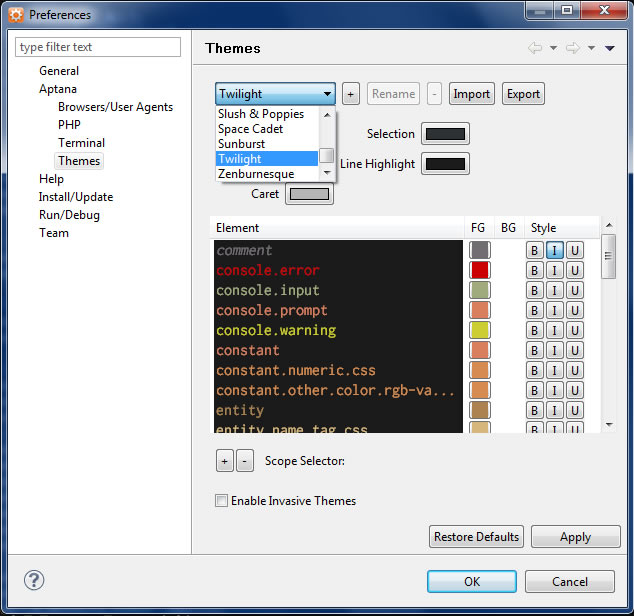
2) Change the eyeburning theme to any other theme, god ,any other theme will do it fine. Just select Aptana->Theme and you will see something like the photo below:


BONUS PACK: How about the variable highlight, it just messing up my retina!!!!. Well I finally found where is the option to change it so it will look like this:


Well today is your luck day. Just follow this guide:

1) Go again to Windows->Preferences, and then navigate to Aptana ->PHP -> Mark Ocurrences . TIP: If you want to dissable it all, just uncheck all the options here and forget abot the rest.

2) Do you see the link called annotation up there?, just click it and you will see the next windows:


3) Here you will have to modified two options PHP Read Ocurrences and PHP Write Ocurrences, does those name make sense to you? neither to me, but what the heck, Aptana rules but the color schema suck, but you can change it anyway so enjoy it.

IE6 and Ubertcart

There's a problem with Ubercart and any modules that use a great quantity of CSS files in Drupal. It doesnt seem to work in IE (any version).

Sympthoms
You install Ubercart or any other big module in Drupal. you test it and seems fine in all the browsers , except IE (again, any version). Seems like some CSS files are missing.


WTF happened to my CSS! yelling is another sympthom of this IE induced disease

Cause:
IE6 was created to support only 31 stylesheets if you use the link tag to insert them. So when you install ubercart, theres a big possibility that youre excedding that nonsense limit. Have a good day with that.

Remedy:
There are two ways to work this in Drupal without feelin like youre kicked in the nuts with an iron spiked shoe:
  • Im too young to die way (Easy Way): Just use unlimited css module, install it an forget about it. This module will call all the CSS files via an @import rule , you can have more thant 31 @import rules in IE, that why it work. Just as a side note, as a good web developer youre not supposed to use the @import rule because its mean trouble.
  • Hurt me plenty way (Medium Way): Activate the Css File Optimizer in Drupal. Go to admin/settings/performance and you will find the option Optimize the Css Files (duh!). This will mix all the css files in your web page to just one file. I couldnt make it work in my server, this option need a beefy machine to run so make sure you have a really reaaaaally fresh backup of your site before activating this.
You can also activate the Optimize the Javascript Code option, jsut remember to make a backup

So at least in Drupal there are ways to deal with it. Hey dont blame IE for teaching you about web server performance and making you lost 4 hours of your life yelling like a crazy schoolgirl before a Jonas Brothers concert.

Hate the Computers Gnomes, yeah thoses little rascals causing trouble again.


Change the Scayt language in Drupal CKEditor Module

This will be a short post about that dammed Spell Checker that comes active by default in the Ckeditor module of Drupal. Well as to this day the best WYSIWYG Module in Drupal 6 (for me) is Ckeditor. Its simple to install, fast as hell at least compared to Fckeditor, and easy to configure, except the SpellChecker plugin.

Yes Ckeditor has an SpellChecker, No its not easy to configure.

By Default the SpellChecker plugin is active, and in english, so i couldnt find a way to deactivate it but at least I found the way to change the language. Just search for the string 'en_US' in the file ckeditor.js and change it according to the idiom you want.For spanish is 'es_ES'. You will found this file in the real ckeditor directory , not in the module.

That file is a minimized version of ckeditor. You can found the source in '_source' directory, just in case you wonder what does the real ckeditor do.